CDF Tips and TricksMemory (or the lack of it)The absolute #1, king kahuna, frequently most encountered issue with CDFs is RAM cram (lack of memory). Confusion about this problem occurs because DataEase doesn't say "You don't have enough memory to use this CDF library.". Instead it says something like "Unable to locate 'xxxxxx.xxx'.". Makes sense to me. If you see this message, aside from the obvious (the file IS there, isn't it?), the cause is not having enough DOS memory to load the CDF. Now we get calls all the time where the caller says, "But I have a Pentium with 400Mb of RAM! How can I not have enough memory?". Easy. Remember, DataEase is an old, DOS program. When it was put together, 32-bit, linear-addressed memory spaces, like NT and 95/98 use, were just a pipedream in Billy Gates mind. In the old days, 640k was the max size of a program. Now, despite DE16M's ability to use lots of memory for certain things, the executable code must reside in that first 640k of space. This includes any CDF libraries. Now, the DataEase kernel needs about 200k of space. Hmmmm, 640-200=440. Then, you have network drivers, memory managers, mouse drivers and what have you. In the best case scenario, you'll get a maximum of about 480k to play with. Now, HandTools' 200+ functions take about 400k to run. Minimum. If you have some other junk loaded, you can quickly consume that 80k cushion and - BOOM - 'Unable to locate xxxxx.xxx' pops up. Or worse, the application halts and drops you to a DOS prompt. TipsRESERVELOW, which is documented in the DataEase technical guide, can be used in DOS-only environments. We recommend a setting of 512, if you can get away with it. If not, try dropping the figure in 5k increments until DataEase will load. RESERVELOW has NO EFFECT under Windows. If you are using Windows 95/98, play with the memory settings that you will find on the Properties tab for the DOS box used to start DataEase. In particular, set the Total Conventional Memory to 640, Initial Environment to 512, EMS Memory to Auto, XMS to 4096, and DPMI to 4096. Keeping Entry Points in Synch
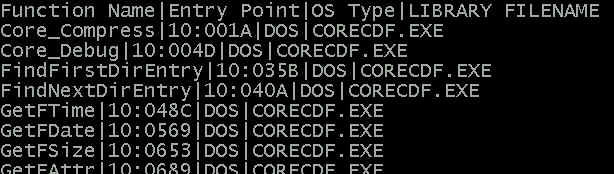
There are two options for an entry point. It can either be blank or it can specify the PRECISE address to which the GOTO will transfer control. If it is blank, then ALL entry points for a given CDF executable must also be blank. In this case, DataEase will query the CDF executable, itself, and ask it to supply its entry points the first time a function is called in the CDF. This would be great, except, in the case of a library like HandTools, which contains over 200 functions, this also takes an exorbitant amount of time to execute. The other option is for the CDF vendor to supply the entry points for its executables. Using entry points drops the load time to nearly instant. But, there is a downside. Any time the executable is altered and re-compiled, ALL of the entry points are likely to change, as well. "So what?", you say. "We buy the CDF, we use it. We don't compile it!". Yeah, but we do. And we occasionally send out new releases, or custom compiled versions and the like. If you try to use an executable whose entry points don't match what is recorded in your Custom Functions form, you're in for a BIG crash. Hard lockup. Messy stuff. That's because DataEase GOTO'ed the CPU to the Outback. So, if you ever replace your executable with a different version, you also must update the entry points recorded in your Custom Functions form to match those supported by the new executable. Our CDF libraries come with a unique feature that simplifies this process, somewhat. You can execute any CDF executable from LANimation from a DOS command line if you supply a '-d' switch (without the switch you get a little error message telling you that you can't run the program standalone). The '-d' stands for 'Dump' as in 'Dump your entry points to a file!'. When you run one of our CDF s with this switch set, the program examines itself and creates a file containing its entry points with a '.DMP' extension. So, if you run: >HTCDF -d and then: >DIR HTCDF.* you will see a brand new file called 'HTCDF.DMP'. If you look at the file with a text editor, you will see something like this:
which is simply an importable listing of the CDF functions provided by the executable and their entry points. (actually this figure shows a listing of CORECDF.DMP). To update the entry points in your DataEase Custom Functions Form, simply import the .DMP file as a delimited text file (Field Separator="|", Record Separator=<new line>), by Field Name, 'update matching' into your existing CDF Functions system table. Note that this assumes you have already installed the CDF library into the database the first time. Switching LibrariesIf you want to switch from using the massive HTCDF.EXE to one of the slimmed-down sub-libraries - like the trim, lean and mean CORECDF.EXE - then you must do a little extra work. First, write a proc that clears the entry points from ALL records in the CDF Functions table: For system Custom Functions with Library Name = "HTCDF.EXE" ; modify records Entry Point := BLANK . Then, from a DOS prompt, run the new CORECDF.EXE with a '-d' command line switch: >corecdf -d This will create a new .DMP file with the correct enty points for this executable. Then, import this file as described above. Then, you need to eliminate all CDF records left that don't belong to CORECDF.EXE (since it's a subset of HTCDF.EXE). They can be identified because their entry points will still be blank. For system Custom Functions with Entry Point = Blank ; Delete Records .
|